
Initially, the challenge was about scaling
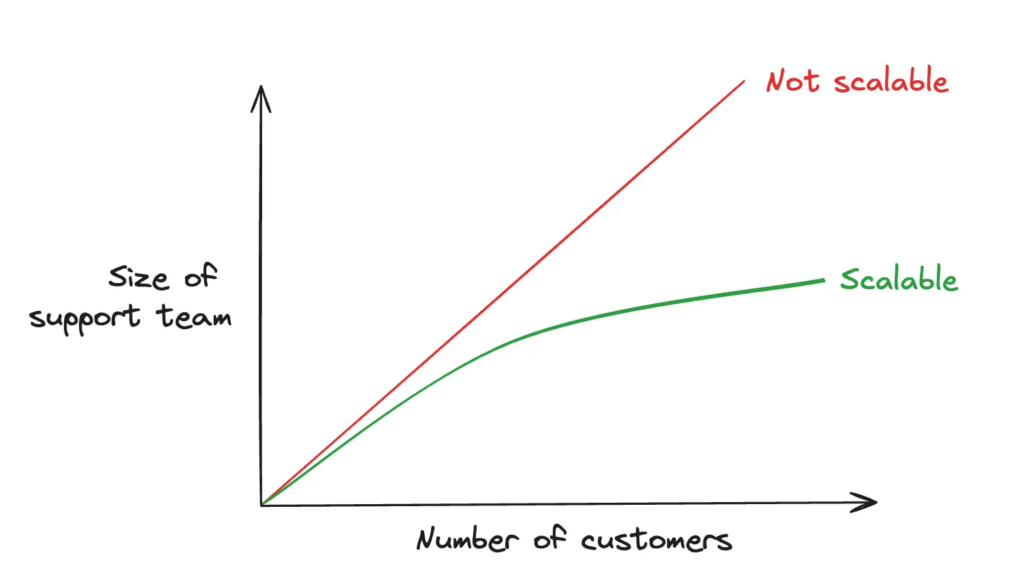
At our software publishing company, our customer base is growing every day (which is good news), and we are therefore faced with the ongoing challenge of providing the same quality of customer support without increasing the size of our teams proportionally.
This is a classic scalability issue faced by many tech teams, as illustrated by this diagram:
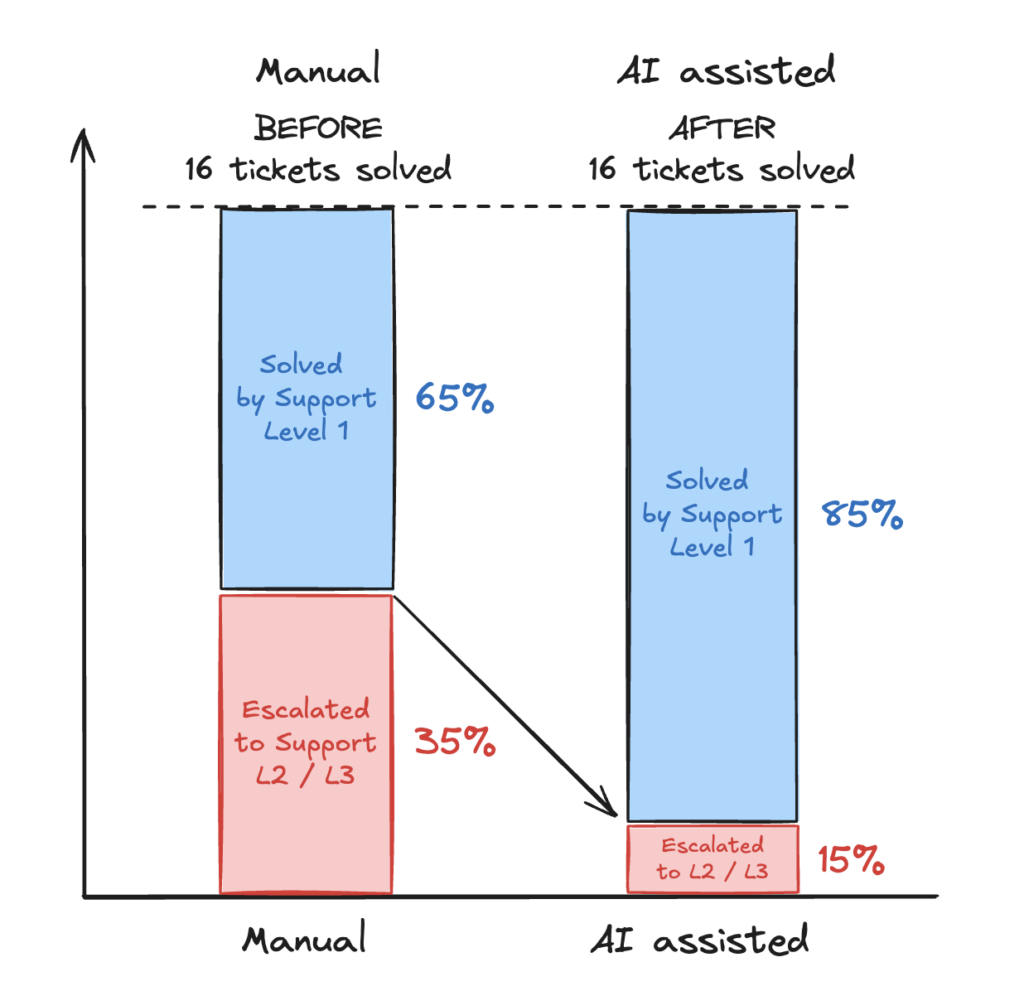
Convinced that many of the issues reported by users are recurring, even if they are not expressed in the same way by all users, I suggest that the teams test AI with our own field data to speed up responses to users. After a few weeks of experimentation, there were no major revolutions or wow effects, but undeniably time was saved on certain tickets—small, step-by-step progress with a significant impact on our performance, illustrated by these measurements:
- First-level support: 4 out of 16 tickets are no longer escalated but handled directly by Level 1 teams thanks to AI-generated responses.
- Second and third level technical support: between 4 and 5 hours saved per week per person on resolving the most complex issues with the help of AI diagnostics.
Team productivity improves: some tickets are resolved in minutes instead of hours. Some of the tedious work of searching through history is made easier, freeing up time for people to focus more on resolving root causes.
Let us now examine how we arrived at these results, which are most likely widely reproducible in most organisations.
Manual resolution of customer requests
Here is a simplified overview of our customer support process: issues are reported either by our customers (customer requests) or via our monitoring probes (system failures).
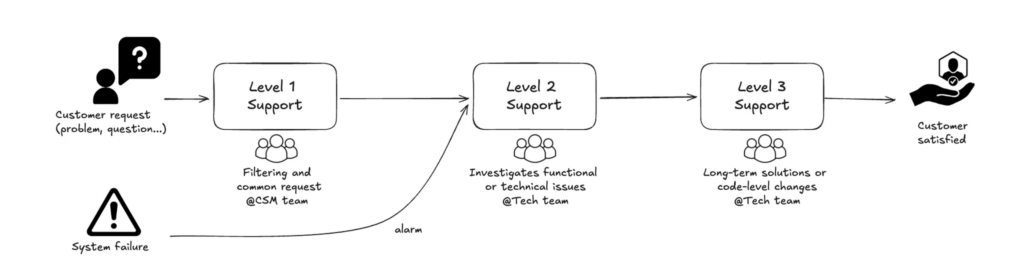
Every day, the team resolves problems as quickly as possible: unavailable API, network issues, attempted attacks, certificate problems, memory saturation during batch processing, database deadlocks, etc. Sometimes, the team has time to tackle the root cause, but sometimes, due to the urgency and volume of tickets, they simply restart the service (repair) without analysing the real cause. In the latter case, the problem will most certainly recur.
Let us now examine how the advent of AI, and particularly the RAG approach, has opened up new possibilities.
Choosing RAG AI to accelerate problem solving
A RAG AI is a classic LLM AI (ChatGPT, Claude, Mistral, etc.) to which we add a corpus of our own data in order to specialise it for analyses that take our specific characteristics into account.
https://en.wikipedia.org/wiki/Retrieval-augmented_generation
Here are some solutions available in December 2025:
- ChatGPT → Projects
- ClaudeAI → Projects
- Google → NotebookLM
- …
We opted for NotebookLM Pro because it is included in our global Google licence and, above all, because it is easy to implement with no coding required. Shortly afterwards, we also reproduced the same prototype with ChatGPT Plus using Projects. Of course, more experienced users can build and train from scratch using blank models or Agentic, but this requires more advanced skills.
Let us now look at the steps involved in building the data corpus and training the AI on our sources in three stages:
- Identify data sources throughout the process
- Collect data
- Load data into AI
Preparing AI using our field data
1 – Identify specific data sources
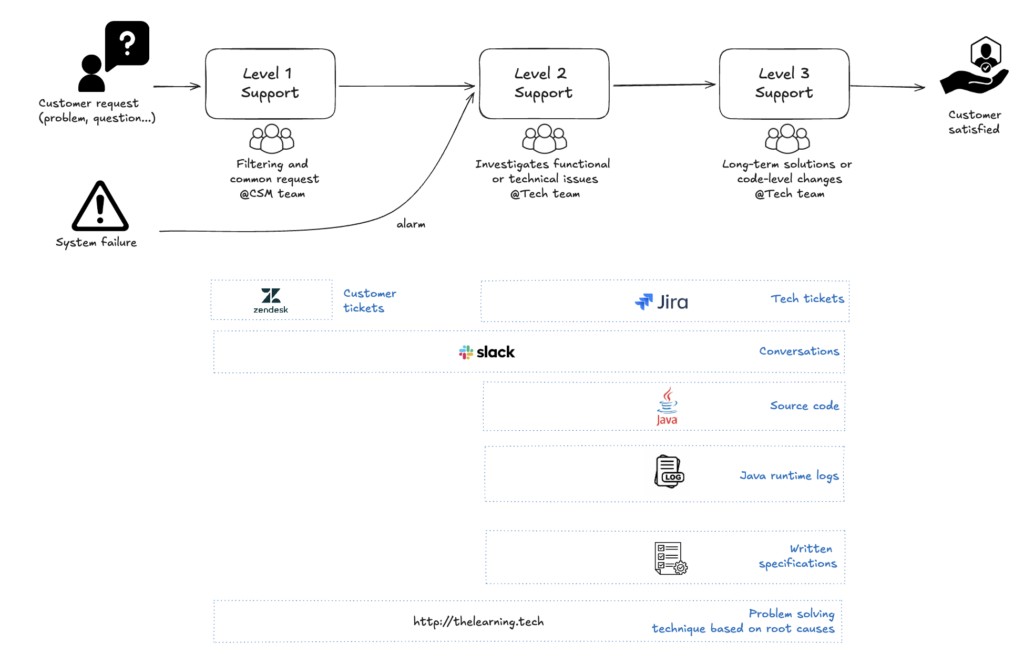
The first step is to identify the corpus of data handled by teams when resolving incidents in two stages:
- observe the process from start to finish
- record the data produced though the tools used
In my case, here is a simplified version of the end-to-end process and the data produced:
2 – Exporting data
The next step is to export all the data produced (Zendesk tickets, Jira tickets, Office documents, etc.) into formats that can be understood by AI (PDF, TXT, CSV, JSON, JPG, URL, etc.).
Most tools such as Jira, Notion, Slack, etc. offer export features that allow you to retrieve all fields. For my part, I exported the information contained in some of the tickets (customers), taking care to anonymise certain data. For Zendesk, there is no export feature via the menus, so it is necessary to use a Python script to utilise the export API.
In my case, I also uploaded my own blog post on problem solving, which subsequently enabled us to ensure rigorous analysis using the root cause analysis technique.
⚠️ Of course, there is the question of the privacy of imported data. I therefore encourage you to validate this type of experiment internally within your company, check the terms and conditions of each AI, favour paid subscriptions and avoid exporting any confidential data (credentials, confidential financial data, personal data, etc.).
3 – Load the data into the RAG AI
Loading sources is essentially a minor detail, as it simply involves uploading them to the tool.
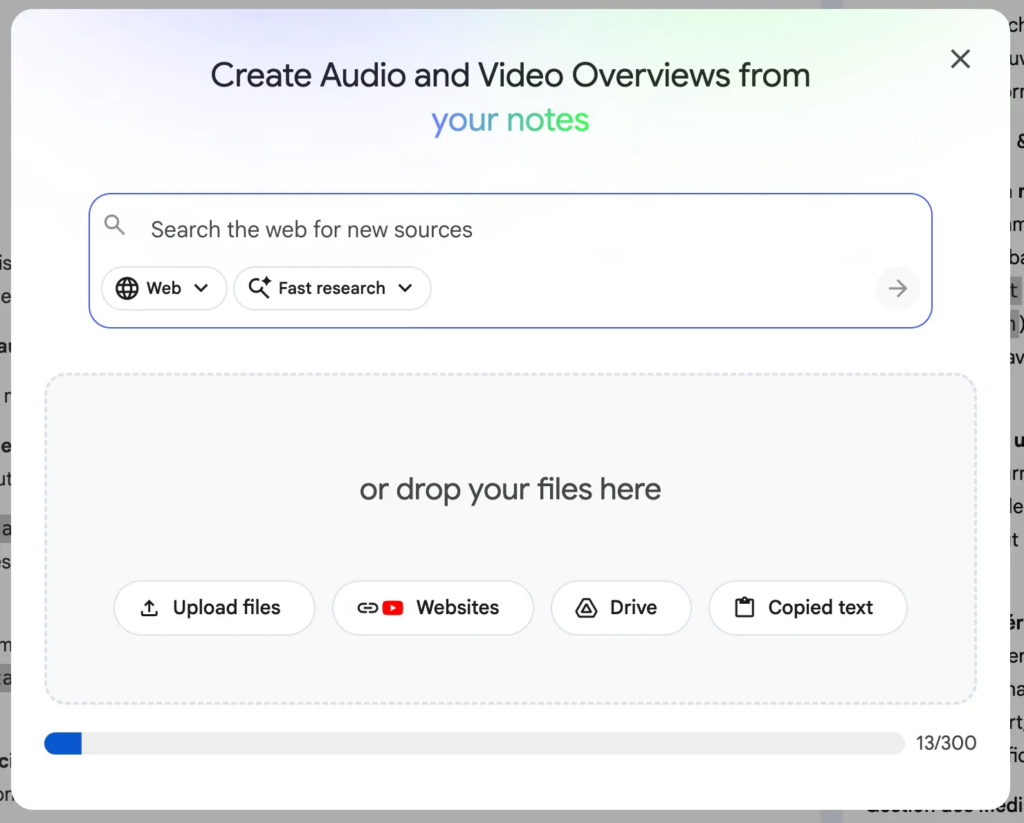
⚠️ File size/token limits are not always easy to understand. These limits are constantly being revised and will likely be obsolete by the time this article is published 😊.
Once the files have been loaded, the AI is now trained on our own data corpus and able to respond to our prompts based on our sources as well as its original training (= the web).
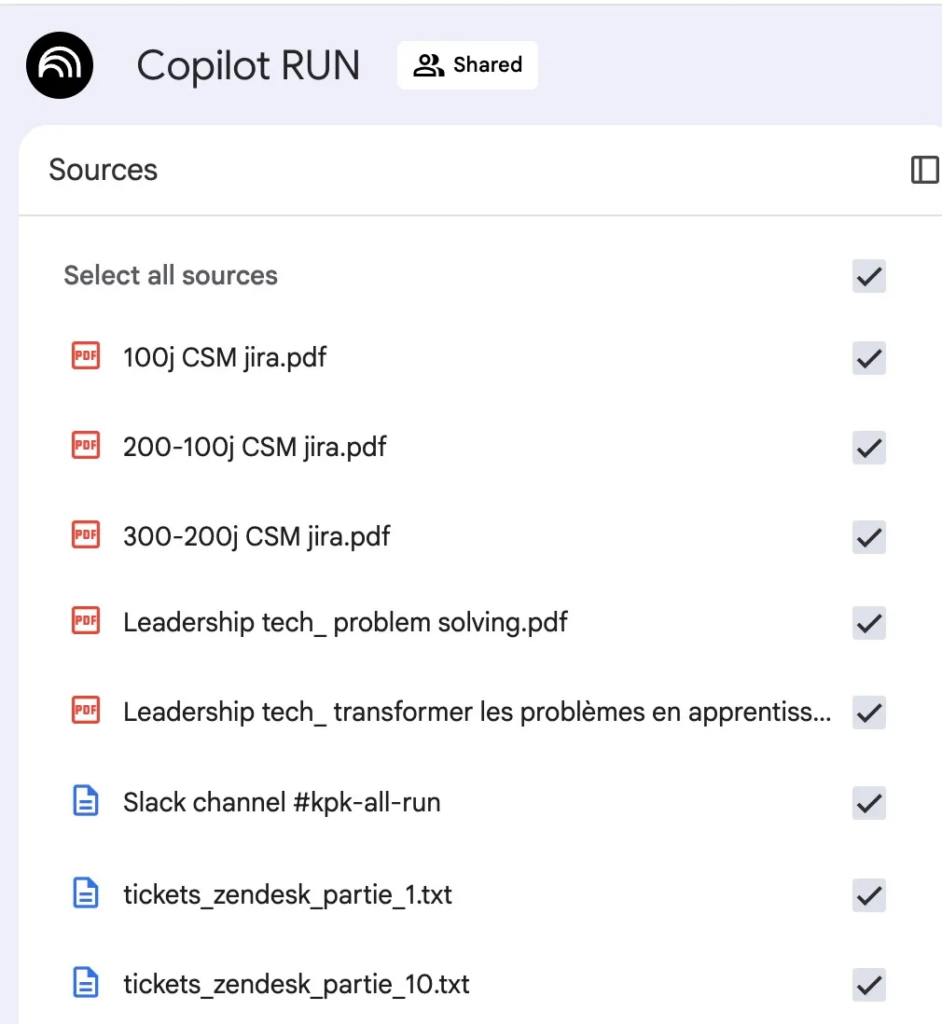
RAG AI is now ready to be used for various purposes. Let us now look at three use cases where it has proven particularly relevant.
Some use cases
Case 1 – Prompting to respond to customers more quickly
Our objective: to immediately find the answer to the problem reported by the customer via a prompt.
During the initial tests carried out with Moustapha, the developer in charge of analysis and fixes (Level 2 and Level 3 Support), I asked him what was the last difficult ticket he had worked on. It was a recurring processing issue for one of our major clients. So we wrote a first prompt together:
We encountered the following incident for customer Xxx. Here is an extract from the logs and the description of the Zendesk ticket:
"extract from the logs"
"ticket content"
Requirement: use the ticket sources provided, following the problem-solving approach
Question 1: Can you tell us if this incident has already occurred in the data sources we have loaded?
Question 2: What was the root cause of this incident?
Question 3: How can this incident be fixed?
Within seconds, the answer is clear: this problem already occurred on 14/01/2024. The causes and actions taken at the time are clearly explained (everything was logged in Zendesk/Jira at the time).
Reading this reply, I remember Moustapha’s face: a real wow effect 😄
Moustapha: That’s exactly the correction I made this week ! But I had completely forgotten that it had already happened on 14 January 2024!
Me: And how long did it take you to fix that problem this week?
Moustapha : At least 4 hours 🥶
The prototype looks promising, and Moustapha is keen to test it !
After several weeks of experimentation, here are the results obtained in terms of time saved – approximately 3 to 4 hours per week per person:
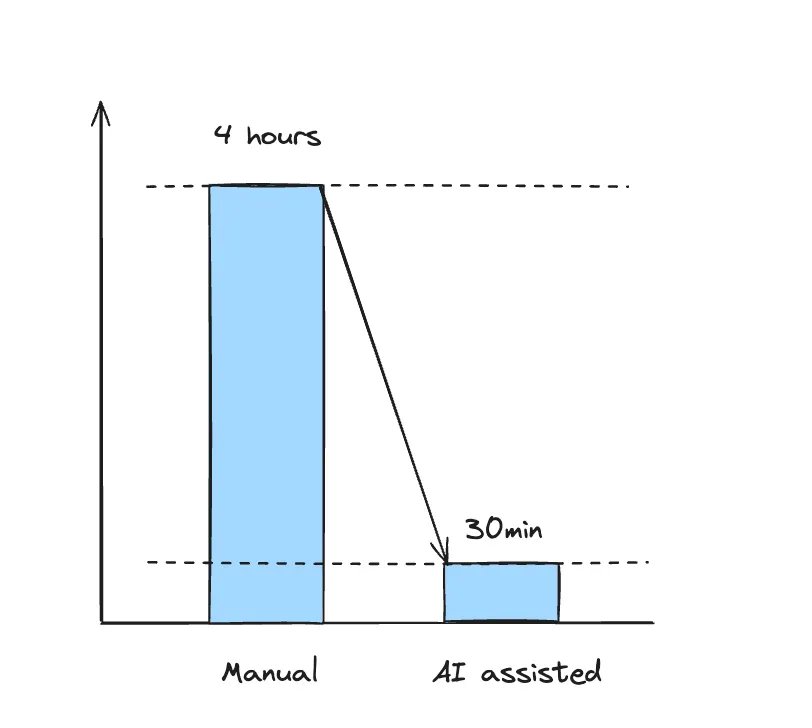
On the Level 1 Support side, the results are similar, with a gain of approximately 3 hours per week per person. This is a good start, given the simplicity of setting up RAG AI.
Case 2 – « Shift left » – Respond to the customer as soon as possible without escalating
Our objective: to handle as many tickets as possible at level 1, limiting escalations to levels 2 and 3.
Example: a complex question about the use of our API was traditionally escalated to level 2 support, then level 3, before reaching the development team’s API specialists. The immediate consequence was a longer response time for the customer (lead time) and interruption for the developer in charge of the response (context switching): they would respond, then resume their usual work.
Thanks to our RAG AI, we have seen an increase in tickets handled directly by Level 1. Indeed, Level 1 support staff with basic knowledge of the API are now able to provide more technical answers with the help of AI (endpoint, JSON input, output, tips and tricks, etc.) because this information has already been covered in our knowledge base.
The gain is significant: approximately 20% of tickets arriving at support are no longer escalated but answered directly by N1 support.
Case 3 –« The best service is no service! »
Objective: to offer customers self-service solutions directly via FAQs, tutorials, etc.
To reuse the now famous phrase, « The best service is no service! »: the ideal situation would be to prevent our customers from having to contact support by providing them with all the help they need with any questions or issues they may have; to take the « Shift left » approach to its logical conclusion.
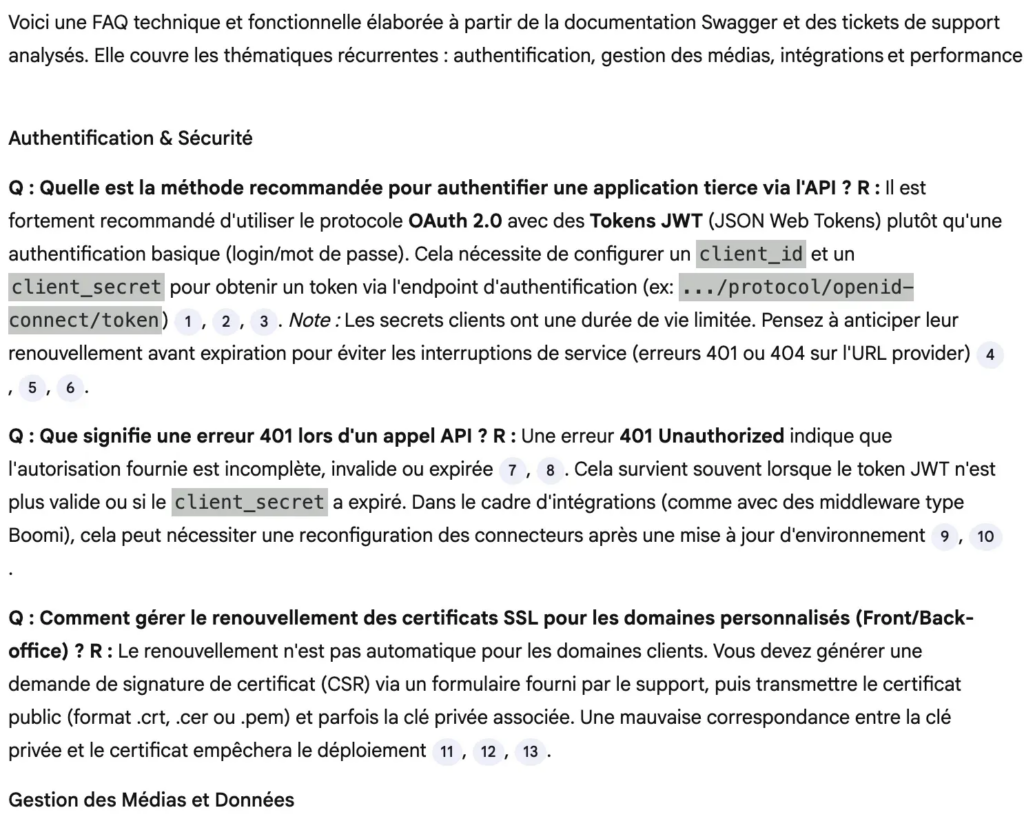
In this particular use case, AI can easily process the several thousand tickets from the last two years and provide us with answers to the most frequently asked questions, FAQs, user help sheets, etc.
In this particular use case, AI can easily process the several thousand tickets from the last two years and provide us with answers to the most frequently asked questions, FAQs, user help sheets, etc.
Next steps
These encouraging initial results demonstrate the value of this RAG AI, trained on our field data, in assisting us with specific, repetitive tasks for which our memory is insufficient. No revolutions, but steady progress that is making a lasting difference.
Furthermore, this type of experimentation has a viral aspect that we have observed internally during demonstrations. With minimal investment, it is possible to test and see if it is relevant. As a result, within our company, a dozen experiments are currently underway in Tech, Marketing, CSM, Professional Services, and other departments.
The next steps for us:
- Automate imported data to ensure it is always up to date: implement Python processing to collect data incrementally via API.
- Use NotebookLM learning tools (quizzes, podcasts, mind maps, etc.) to train newcomers and improve versatility within the team.
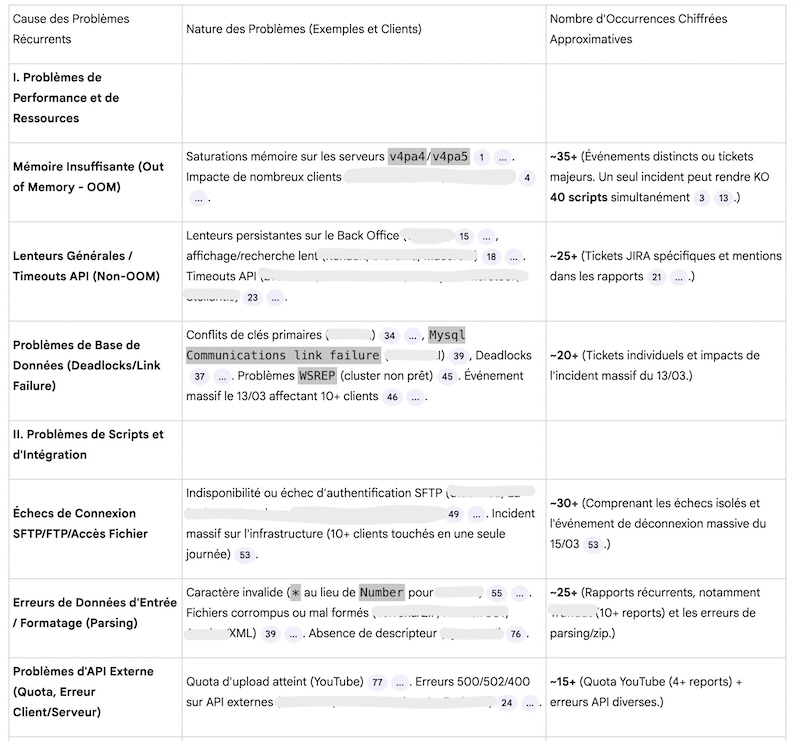
- identify the most incident-prone treatments (in accordance with Pareto’s Law, 20% of causes account for 80% of problems):
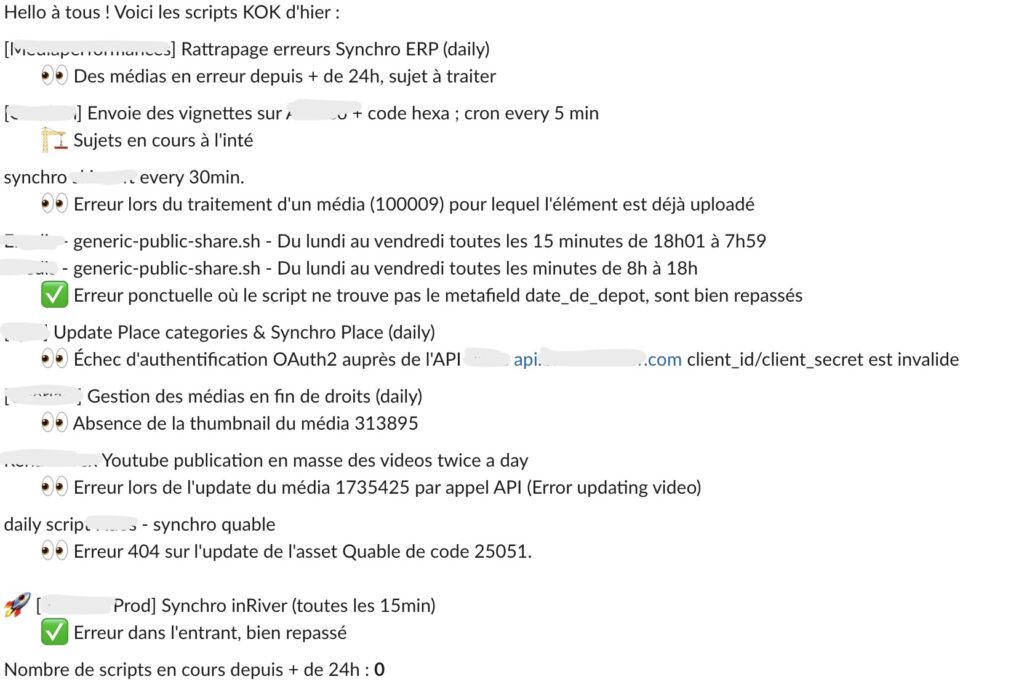
- Extract logs from overnight processing, identify KO, build a message, send the message in emails and in Slack channel (Agentic workflow) – time saved: 20min / day for 1 person
How do you use AI on your own data to speed up repetitive tasks for your teams and improve your scalability?
Thank you to Moustapha I., Céline M. and Lucas S. for their trust, enthusiasm and curiosity, which were essential ingredients for the success of these experiments 💛
Laisser un commentaire